
Thank you very much for placing confidence in us and purchasing CUBEVISIONMODULE. CUBEVISION offers you an unparalleled visualization that is unique and intuitive. This documentation will enhance your experience with the product and help you achieve your goals faster.
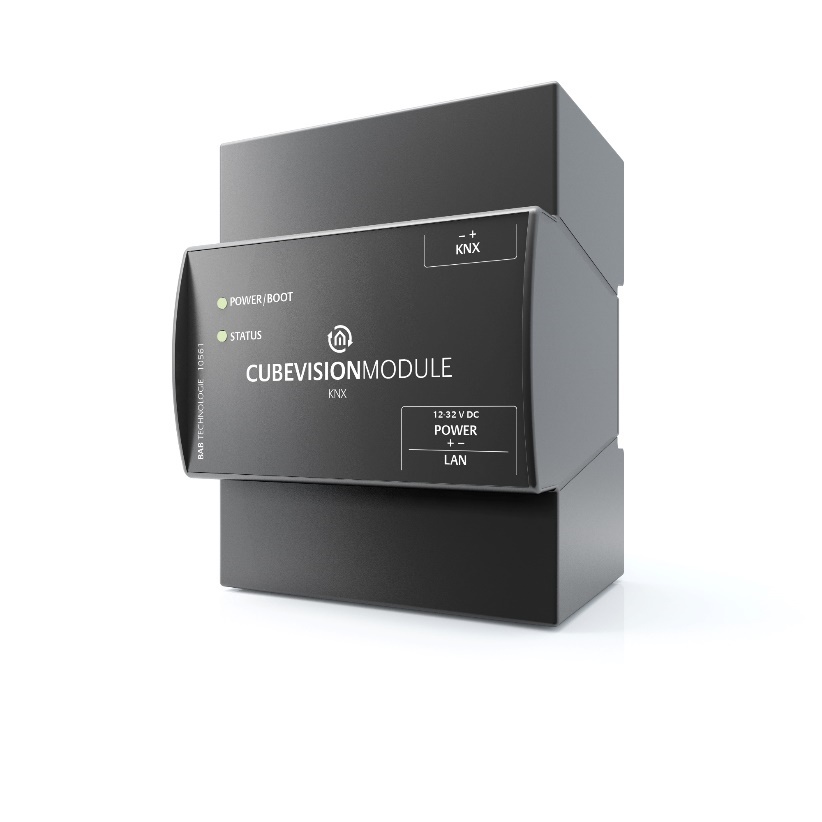
|
Product name: |
CUBEVISIONMODULE |
|
Intended use |
Visualization |
|
Design: |
Modular device (REG) housing 4 TP |
|
Interfaces: |
LAN, KNX or EnOcean |
|
Item number: |
10561 (KNX) / 13560 (EnOcean) |
Range of functions
The CUBEVISIONMODULE is a visualization gateway between KNX and/or EnOcean) and the Ethernet. It includes the established CUBEVISION visualization. CUBEVISION is a browser-based visualization based on HTML 5 technology, and free of licence costs: a visualization which can be operated intuitively and set and adjusted easily.
Functional overview:
-
Integrated multi-user browser visualization based on HTML 5, free of licence costs
-
Integrated Java-based visualization editor, free of licence costs
-
13 pre-formulated visualization elements with different function and feature modifications
-
Automatic creation of the visualization based on building structure and element assignment
-
File your own background images (jpg, png, gif)
-
Favourites function optionally arranges the elements according to frequency
-
Quick navigation to quickly navigate through the rooms
-
"Quick Floor Navigation" for quick, efficient navigation through the floors
-
Special interface for operating RGB and RGBW luminaires with scenes and favourite colours
-
Special interface for automatic and manual multimedia control of Squeezebox, AUDIOMODULE and SONOS radio stations
-
Special interface for displaying diagrams, with comparison and freeze function, bar graphs and data types from 1 bit to 4 bytes
-
Special interface for displaying and retrieving weather data from the Internet with automatic configuration by simply entering the city or postcode
-
Special interface for displaying weather data from KNX with temperature, wind speed, wind direction, brightness, atmospheric pressure, humidity, rainfall and any desired value
-
Special interface for the display of IP camera pictures in MJPEG and JPEG incl. PTZ control and approach position
-
Switch / dimmer element with relative / absolute dimming, value display and different icons
-
Button element with toggle function, button, constant value, value display and different icons
-
Temperature / RTR element with heating / cooling, extension, operating mode switching
-
Blind element with roller shutters, blinds, Venetian blinds and "Touch & Slide" operation
-
Window contact 1 bit, 1 byte and breakage of glass
-
Value indicator, input with restriction, factor and offset
-
Group / scene switch with 33 different icons and data type1 bit and 1 byte
-
Several visualization projects possible
-
User administration with access restrictions up to individual pages possible
-
Optional and freely selectable categorization of all elements for separate central overview
-
Address status table with all 32,766 KNX as well as 32,768 virtual addresses for deriving the object states (no bus initialization necessary).
-
Circular buffer for 20,000 telegrams, exportable as CSV file
-
Assignment of SONOS radio stations via UPnP
-
Smart Function Creator
-
User defined scenes
-
Integrated HOOC VPN solution
-
Data backup and recovery
-
Integrated update mechanism for software updates free of charge
-
KNXnet/IP server with integrated KNXnet/IP routing and tunneling
-
Time zone setting
-
Synchronization with NTP time server
-
User administration for the access to the configuration
-
Address transfer from ETS (*.esf file)
-
No data point restriction
Technical data
Article No. 10561 (KNX) | 13560 (EnOcean)
-
Operating voltage: 12–32 V DC
-
Typical power consumption 300 mA at 12 V DC
-
Power consumption: <= 5 W
-
Connection: Power supply via screw-type terminal
-
Resistant to climate: EN 50090-2-2
-
Ambient temperature: –5 to + 35 °C
-
Rel. humidity (non-condensing): 5 % to 80 %
Mechanical data:
-
Assembly: Modular device (REG) housing 4 TE
-
Dimensions (W x H x D) in mm: 70 x 90 x 63
-
Housing: Plastic
-
Degree of protection: IP20 (according to EN 60529)
Interfaces:
-
Ethernet via RJ-45 connector
-
KNX®: Twisted Pair via terminal (= 1.5 mm²)
-
EnOcean®: SMA plug connector (incl. 2.5 m magnetic base antenna)
EnOcean specifications:
-
Operating frequency: 868.3 MHz
-
Range: 300 m in the free field / 30 m in the building (depending on the building material)
-
Input objects: Any number
-
Output objects: 128
-
External antenna: 2.50 m cable, magnetic base and SMA plug connector.
Specific features:
-
Exclusive visualization design
-
Quick setup
-
Automatic scaling on all end devices
Software requirements:
-
Operating system: Platform-independent
-
Communication: Network interface
-
Modern standard browsers
-
Java Virtual Machine or BAB STARTER (only for configuration)
Scope of delivery
The scope of delivery of CUBEVISIONMODULE includes the following content:
-
1x CD with the corresponding documentation and auxiliary programs
-
1x CUBEVISIONMODULE
-
1x 2.5 m magnetic base antenna (optionally available in the case of EnOcean version 13560)
A power supply unit for the device is NOT included in the scope of delivery!
In addition to the connection for the power supply (12-32 V DC), the CUBEVISIONMODULE has the following interfaces:
-
1x RJ-45: Ethernet 100Mbit/s Full Duplex
-
KNX® / TP connection or SMA female connector for EnOcean (currently being planned)
-
Updates
We reserve the right to offer firmware updates free of charge for the CUBEVISIONMODULE. In our newsletter, you will be informed of any possible firmware updates. The update files are made available in the download section on our homepage.
Important information on the operating instructions
We reserve the right to make technical and formal changes to the product provided it is in the interest of technical progress. Therefore, the information in this documentation may deviate from the current state. Information on current CUBEVISIONMODULE firmware and also on this description ("CUBEVISIONMODULE documentation") can be found at www.bab-tec.de.