
A new data point is created by clicking on the grey area with the PLUS sign.
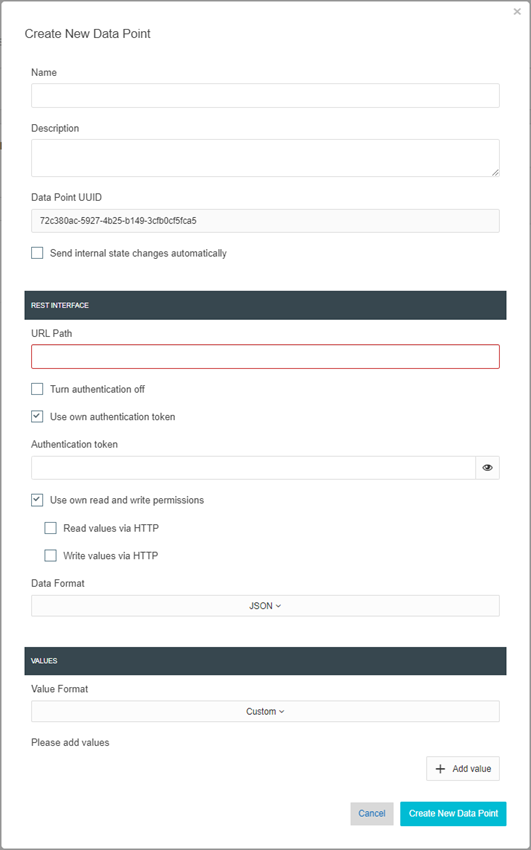
When creating new data points, a window opens in which the following parameters are specified.
General
-
Name:
A descriptive name for the data point is assigned here -
Description:
A more detailed description or important information can be stored for the data point in this text field -
Data point UUID:
This field is automatically filled in by the LOGIKEDITOR and cannot be changed. It is used for unique internal identification.
Alternatively, this data point UUID can be used as a URL path. -
Output status changes automatically:
This option defines whether a change to the telegram value should be output automatically via the REST-API.
Rest-Interface
-
URL path
The path for the end point is entered in this field. This path is entered in the "user-defined" part.
NOTE: The path must be unique. -
Switch off authentication
This option deactivates authentication for this data point if required. This allows the global setting to be overwritten. -
Authenticate with your own token
To assign an individual authentication token to data points, this option can be used to assign the data point its own token. This is useful for assigning different devices their own token.
If this option is deactivated, the authentication token that was assigned in the global settings applies. -
Authentication token
This input field is only visible if the option "Authenticate with own token" is activated.
The individual authentication token for this data point is entered in this field. -
Own read and write authorizations
You can also define whether the data point has read or write authorization independently of the global setting. -
Data format
Data/values that are transferred to the LOGIKEDITOR via this data point can be transferred in the following three types:-
JSON,
-
CSV
-
and PLAIN TEXT
-
Values
-
Format
A format can be selected for the expected values. There are two formats to choose from:-
Individual
With this selection, the values can be compiled individually.
TIP: This option also makes it possible to transfer a list of values with an http request instead of many individual nhttp requests. -
KNX data point type
With this selection, the values are predefined according to the definition of the KNX data point type and are created automatically.
Info: The values that are created here can be found in the logic group in the residual value input and value output as inputs or outputs.
-
-
"Add value"
This button is used to add the values for this data point. A name can be assigned for each value created and one of five data types can be selected (see appendix "Data types in the LOGIKEDITOR").
NOTE: This button is only activated if "Individual" is selected.
Finally, the new data point is added in the LOGIKEDITOR using the "Create new data point" button.
///