
Content
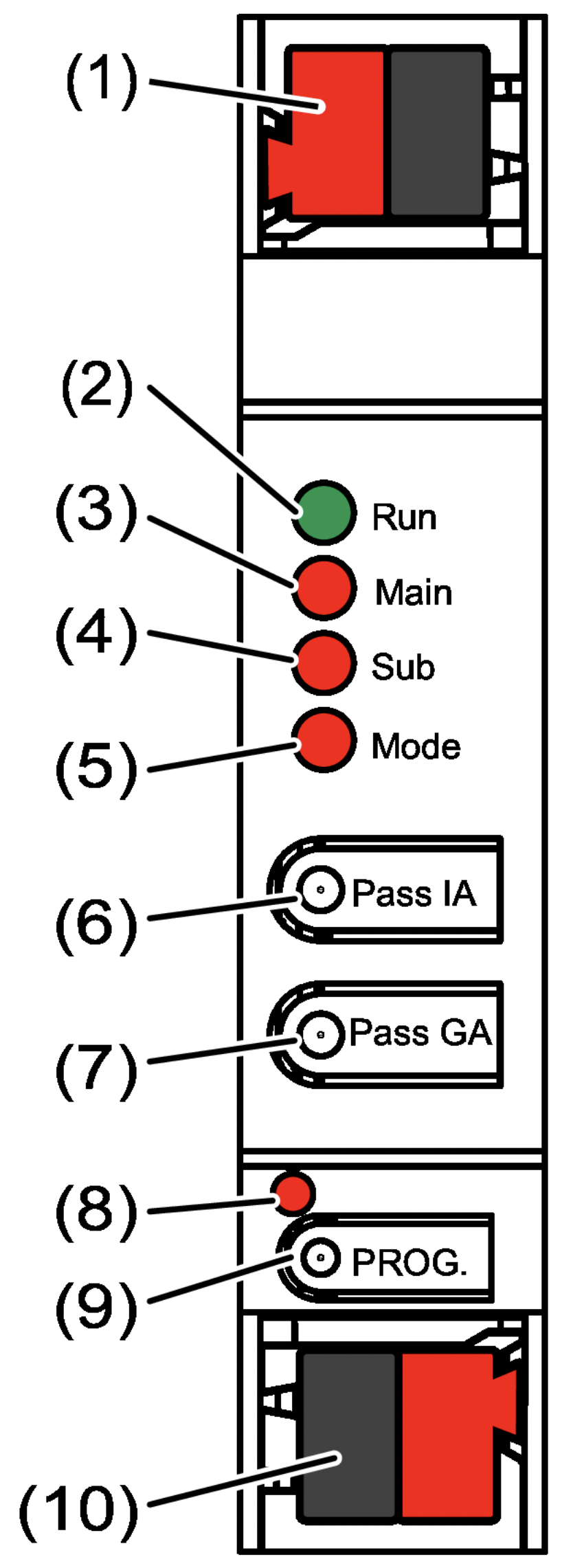
Device-Overview
|
Pos. |
Description |
|---|---|
|
(1) |
KNX bus terminal – subordinate line (SL) |
|
(2) |
Run status LED |
|
(3) |
Main status LED |
|
(4) |
Sub status LED |
|
(5) |
Mode status LED |
|
(6) |
Pass IA button |
|
(7) |
Pass GA button |
|
(8) |
Programming LED (red) |
|
(9) |
PROG. programming button |
|
(10) |
KNX bus terminal – superordinate line (ML) |
Run Status LED
|
Indication |
Description |
|---|---|
|
Off |
Power failure on the superordinate line |
|
Green (steady) |
Device ready for operation. The superordinate and subordinate lines are supplied with power. |
|
Red (steady) |
Power failure on the subordinate line |
|
Orange (steady) |
Group address filter is disabled |
|
Orange flashing (approx. 1 Hz) |
Physical address filter is disabled |
|
Orange flashing rapidly (approx. 4 Hz) |
Both filter functions are disabled |
Main Status LED
|
Indication |
Description |
|---|---|
|
Orange (6 ms) |
Telegram received on the superordinate line |
|
Red (6 ms) |
Single communication error on the superordinate line |
|
Red (100 ms) |
Repeated communication error on the superordinate line |
Note
Error indications have priority over telegram reception indications.
Sub Status LED
|
Indication |
Description |
|---|---|
|
Orange (6 ms) |
Telegram received on the subordinate line |
|
Red (6 ms) |
Single communication error on the subordinate line |
|
Red (100 ms) |
Repeated communication error on the subordinate line |
Note
Error indications have priority over telegram reception indications.
Mode Status LED
|
Indication |
Description |
|---|---|
|
Off |
Device operates as an Area Coupler or Line Coupler |
|
Green (steady) |
Device operates as a Segment Coupler or Line Repeater |
|
Orange (steady) |
Device operates as an Area Coupler, Line Coupler, or Segment Coupler with Secure Proxy enabled |
|
Red (100 ms) |
Pass IA or Pass GA button has been pressed |
Status LED Self-Test
During startup, the status LEDs illuminate sequentially from top to bottom for 0.5 seconds, first green and then red.
///