
KNX SECURE COUPLER
Article No. 10351
(Revision 09.2026)
BAB TECHNOLOGIE GmbH
Hafenpromenade 1–2
44263 Dortmund
Germany
Phone: +49 (0) 231 / 476 425-30
Fax: +49 (0) 231 / 476 425-59
info@bab-tec.de
http://www.bab-tec.de
Made in Germany
SAFETY INFORMATION
To prevent damage and hazards, read and observe the following safety instructions.
Warning
-
Installation and connection of electrical devices must only be carried out by qualified electricians.
-
Risk of electric shock. During installation and cable routing, all applicable regulations and standards for SELV circuits must be observed.
These operating instructions are an integral part of the product and must be retained.
Information
Detailed information can be found in the complete Operating Instructions and the Technical Documentation on our website.
System Information
The device supports firmware updates using ETS version 6.4.0 or later.
The device supports KNX Data Secure. KNX Data Secure protects building automation systems against unauthorized access and manipulation and can be configured within an ETS project.
For Secure Commissioning, the Device Certificate attached to the device is required. Remove the Device Certificate from the device before commissioning and keep it in a safe place.
The following ETS versions are supported for planning, installation, and commissioning:
|
Operating Mode |
Required ETS Version |
|---|---|
|
Area Coupler, Line Coupler, or Line Repeater |
ETS version 5.7.7 or later |
|
Area Coupler, Line Coupler, Segment Coupler, or Secure Proxy |
ETS version 6.1.1 or later |
Device Overview
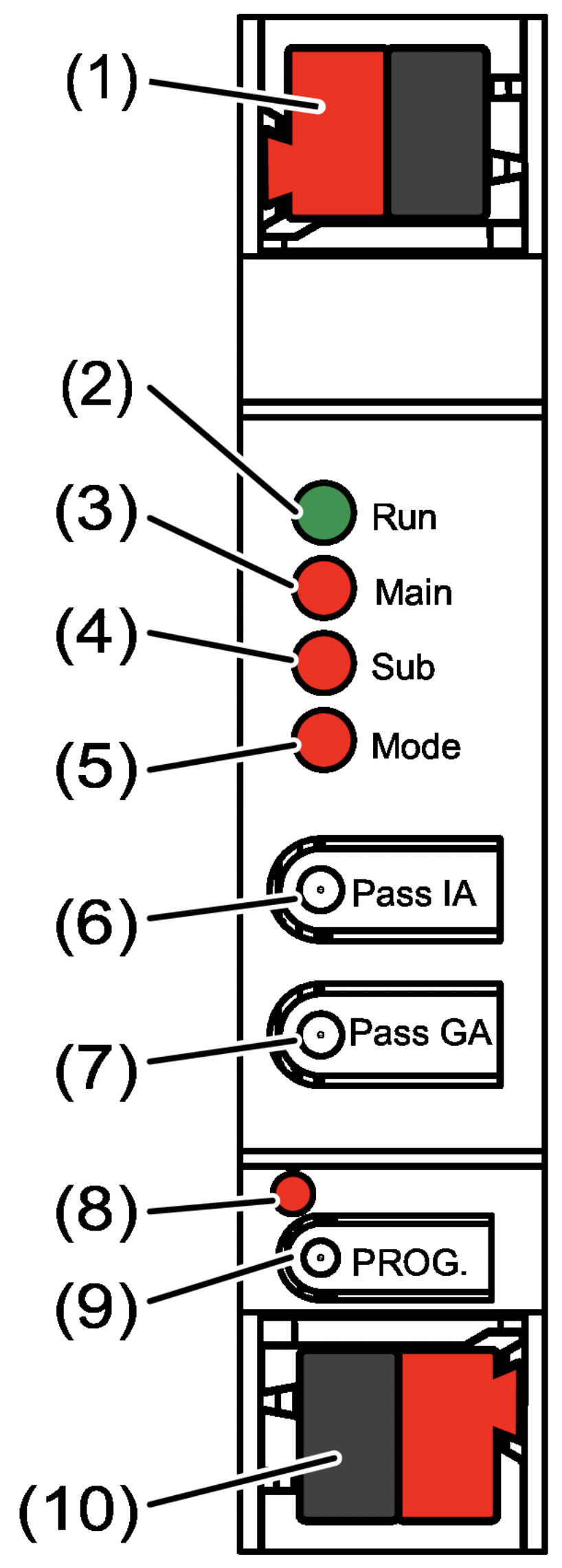
-
(1) KNX bus terminal – subordinate line
-
(2) Run status LED
-
(3) Main status LED
-
(4) Sub status LED
-
(5) Mode status LED
-
(6) Pass IA button
-
(7) Pass GA button
-
(8) Programming LED (red)
-
(9) PROG. programming button
-
(10) KNX bus terminal – superordinate line
LED Functions
Run Status LED
|
Indication |
Description |
|---|---|
|
Off |
Power failure on the superordinate line |
|
Green (steady) |
Device ready for operation. The superordinate and subordinate lines are supplied with power. |
|
Red (steady) |
Power failure on the subordinate line |
|
Orange (steady) |
Group address filter is disabled |
|
Orange flashing (approx. 1 Hz) |
Physical address filter is disabled |
|
Orange flashing rapidly (approx. 4 Hz) |
Both filter functions are disabled |
Main Status LED
|
Indication |
Description |
|---|---|
|
Orange (6 ms) |
Telegram received on the superordinate line |
|
Red (6 ms / 100 ms) |
Communication error on the superordinate line |
Note
Error indications have priority over telegram reception indications.
Sub Status LED
|
Indication |
Description |
|---|---|
|
Orange (6 ms) |
Telegram received on the subordinate line |
|
Red (6 ms / 100 ms) |
Communication error on the subordinate line |
Note
Error indications have priority over telegram reception indications.
Mode Status LED
|
Indication |
Description |
|---|---|
|
Off |
Device operates as an Area Coupler or Line Coupler |
|
Green (steady) |
Device operates as a Segment Coupler or Line Repeater |
|
Orange (steady) |
Device operates as an Area Coupler, Line Coupler, or Segment Coupler with Secure Proxy enabled |
|
Red (100 ms) |
The Pass IA or Pass GA button has been pressed |
Status LED Self-Test
During startup, the status LEDs illuminate sequentially from top to bottom for 0.5 seconds, first green and then red.
Intended Use
-
Connects two KNX lines, segments, or areas for data communication while providing galvanic isolation between them.
-
Operates as an Area Coupler, Line Coupler, or Segment Coupler (with ETS 6.1.1 or later), or as a Line Repeater (with ETS 5.7.7).
-
Designed for installation in distribution boards on a DIN rail in accordance with IEC 60715.
Applications
Refer to the technical documentation for detailed information.
The assigned physical address must correspond to the logical topology of the KNX installation.
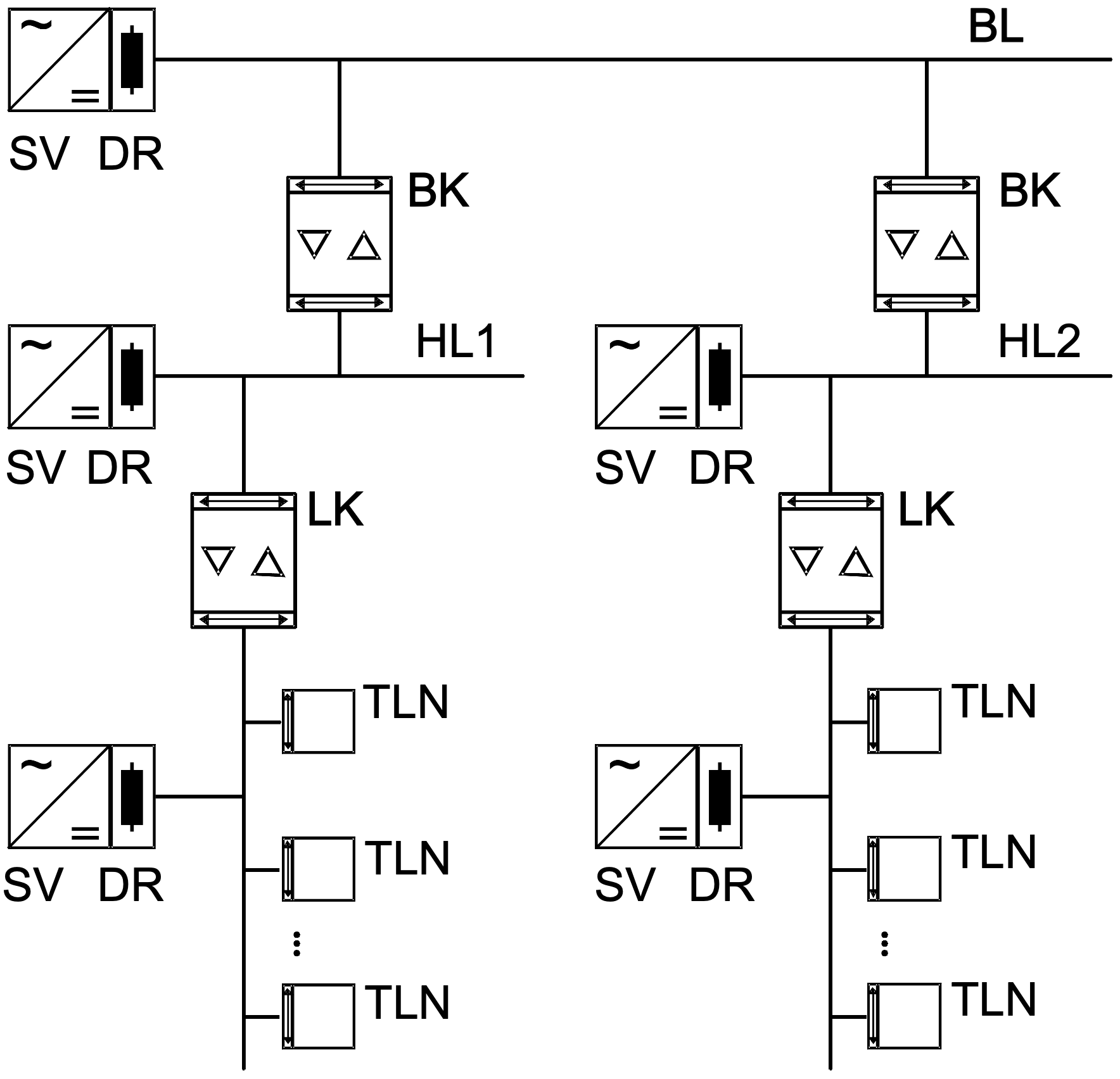
Area and Line Coupler
Figure 1: Operation as an Area and Line Coupler
-
Area Coupler (AC): The physical address corresponds to that of an Area Coupler (
X.0.0). Can be operated with or without filtering. -
Line Coupler (LC): The physical address corresponds to that of a Line Coupler (
X.Y.0). Can be operated with or without filtering.
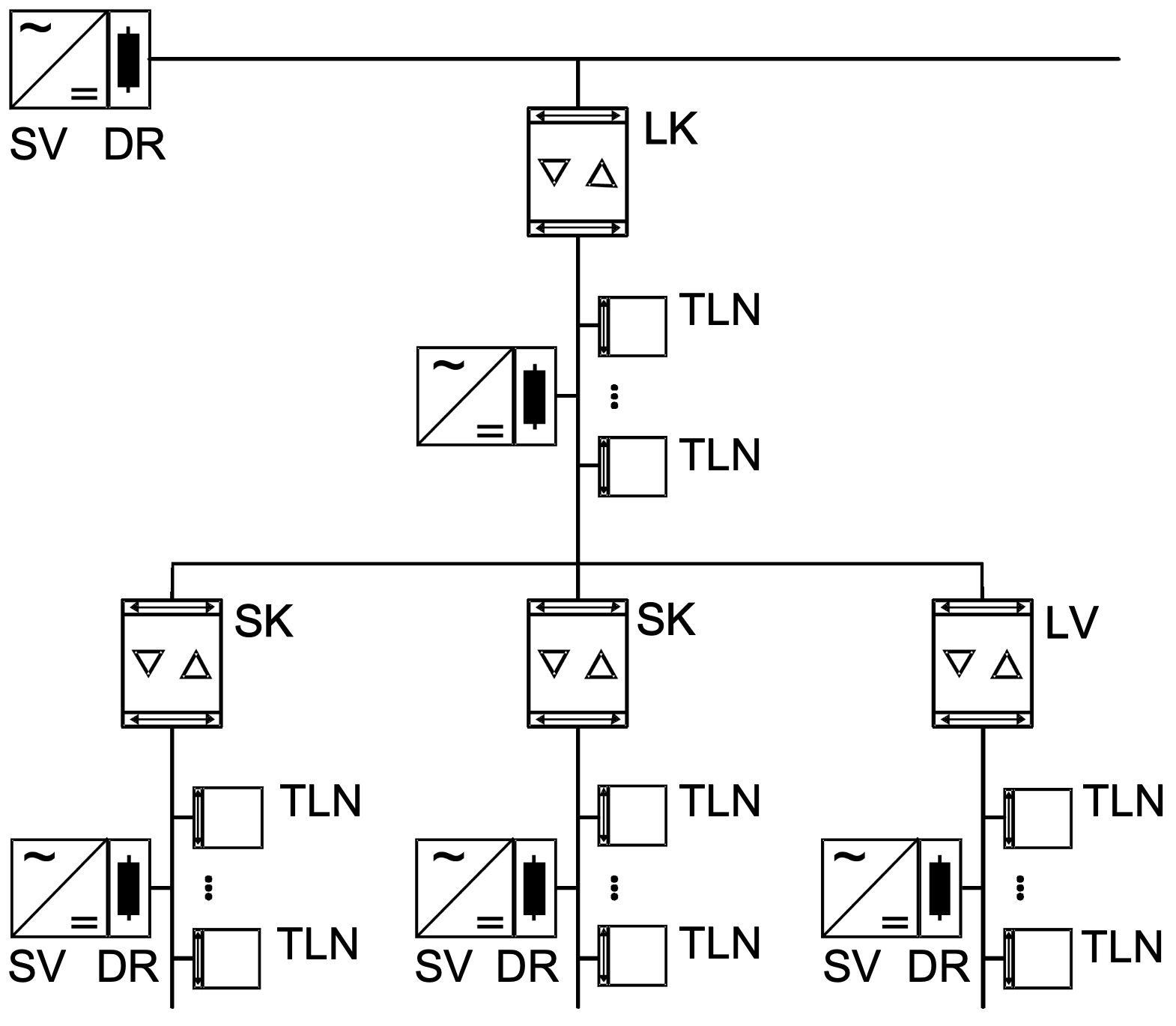
Segment Coupler and Line Repeater
Figure 2: Operation as a Segment Coupler and Line Repeater
-
Segment Coupler (SC): The physical address corresponds to that of a standard KNX bus device (
X.Y.Z,Z ≠ 0). Used to divide a KNX line (maximum 256 devices) into independent line segments. Can be operated with or without filtering. -
Line Repeater (LR): The physical address corresponds to that of a standard KNX bus device (
X.Y.Z,Z ≠ 0). Used to divide a KNX line (maximum 256 devices) into independent line segments. Regenerates and repeats telegrams within a KNX line. Filtering is not available.
Abbreviations
-
HL – Backbone Line
-
AL – Area Line
-
TLN – Bus Device
-
PS – KNX Power Supply
-
CH – Choke
Operation
Enabling and Disabling the Filter Functions
-
Press the Pass IA button to enable or disable the filter function for physical addresses.
-
Press the Pass GA button to enable or disable the filter function for group addresses.
→ The Mode status LED lights up red briefly.
→ The Run status LED indicates the current status of the filter functions (see Device Overview).
Information for Qualified Electricians
DANGER
Electric shock due to contact with live parts.
Electric shock may result in death.
Cover all live parts in the installation area before starting any work.
Installation and Electrical Connection
Secure Operation
Before commissioning the device with KNX Data Secure, complete the following steps:
-
Enable Secure Commissioning in the ETS.
-
Remove the Device Certificate from the device and store it in a safe place.
-
Enter or scan the Device Certificate and add it to the project.
-
Recommendation: Use a high-resolution camera to scan the QR code.
-
Document all passwords and keep them in a secure location.
Installing and Connecting the Device
-
Observe the specified cable routing and the required cable clearances.
-
Mount the device on a DIN rail.
-
Connect the bus cables to the KNX bus terminals (see Device Overview), observing the correct polarity.
-
Connect the superordinate line to the lower bus terminal (10). The device is powered via this connection.
-
Connect the subordinate line to the upper bus terminal (1).
-
Fit the protective caps to the KNX terminals to protect against hazardous voltages.
Information
The subordinate line requires a separate KNX power supply.
Commissioning
Programming the Physical Address and Application Program Using ETS
-
Switch on the KNX bus voltage.
-
Press the PROG. (9) programming button.
-
The Programming LED (8) lights up.
-
-
Program the physical address.
-
Download the application program and the filter table.
Safe State Mode
Safe State Mode stops execution of the loaded application program.
Information
In Safe State Mode, only the device system software remains active. ETS diagnostic functions and device programming are still available. No telegrams are forwarded.
Activating Safe State Mode
-
Switch off the KNX bus voltage or disconnect the KNX bus terminal (10) of the superordinate line.
-
Wait approximately 15 seconds, then press and hold the programming button.
-
Switch the KNX bus voltage on again or reconnect the KNX bus terminal.
-
Release the programming button only when the Programming LED starts flashing slowly.
→ Safe State Mode is activated.
Note
Briefly pressing the programming button enables or disables Programming Mode, even while the device is in Safe State Mode.
When Programming Mode is enabled, the Programming LED stops flashing.
Deactivating Safe State Mode
-
Switch off the KNX bus voltage for approximately 15 seconds, or
-
Restart the device using the ETS.
Master Reset
A Master Reset restores the device to its factory default settings.
The physical address is reset to 15.15.0. The installed firmware remains unchanged.
After the reset, the device must be recommissioned using the ETS.
Note
If KNX Data Secure is enabled, performing a Master Reset disables the device security.
The device can then be recommissioned securely using the Device Certificate.
Performing a Master Reset
Requirement: Safe State Mode must be active.
-
Press and hold the programming button for more than 5 seconds.
→ The Programming LED flashes rapidly.
-
Release the programming button.
→ The device performs a Master Reset, restarts automatically, and is ready for operation again after approximately 5 seconds.
Technical Data
-
Ambient temperature: −5 ... +45 °C
-
Storage/transport temperature: −25 ... +70 °C
-
Protection class: III
-
Weight: 90 g
-
Installation width: 18 mm / 1 DIN module
-
KNX medium: TP256
-
Commissioning mode: S-Mode
-
KNX rated voltage: DC 21 ... 32 V SELV
-
KNX current consumption:
-
Superordinate line: 9 mA
-
Subordinate line: 5 mA
-
-
KNX connection type: KNX bus terminal
Disposal Information
DE: Disposal Obligations

-
At the end of its service life, this electrical device must be disposed of separately from unsorted municipal waste and taken to an appropriate collection and recycling facility.
-
Waste batteries, rechargeable batteries, and lamps that are not permanently enclosed within the device and can be removed without damage must be removed before disposal and disposed of separately.
-
Distributors of electrical equipment and waste collection facilities are required to accept waste electrical equipment free of charge.
-
Any personal data stored on the electrical device must be deleted by the user before disposal.
///