
First example
In this example, a switching command with the value 1 is sent to a data point via the REST API.
-
Switch command: Send value "1"
-
Protocoll: http
-
Data format: PLAIN/TEXT
-
Value format: KNX data point type DPT1 (switch)
-
Authentication: deactivated
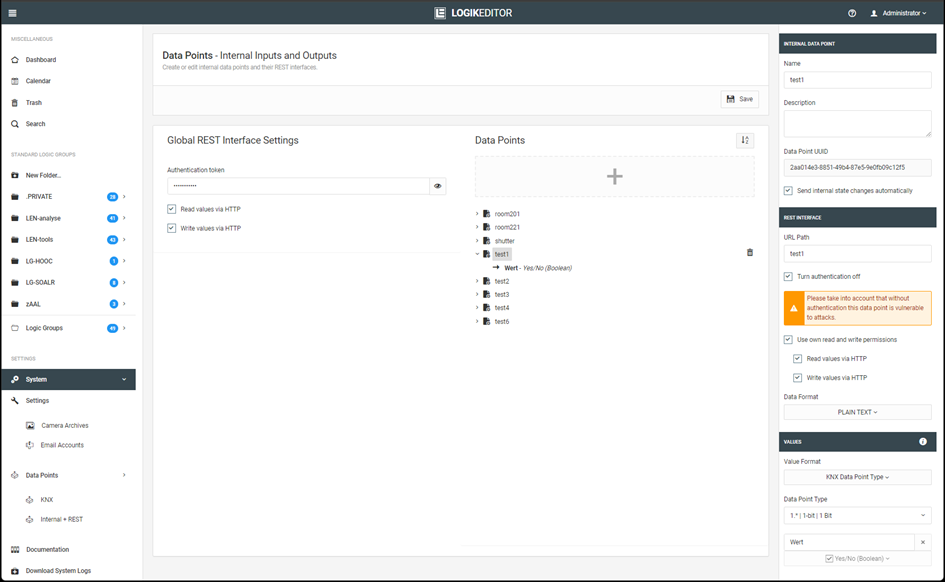
Command via CURL:
curl -vvv -H "Content-Type: text/plain" http://192.168.1.222:81/le/rest/test1 -d "1"
Output:
janni@bt-laptop2:~$ curl -vvv -H "Content-Type: text/plain" http://172.31.160.145:81/le/rest/test1 -d "1"

Trying 192.168.1.222:81...
Connected to 192.168.1.222 (192.168.1.222) port 81 (#0)
> POST /le/rest/test1 HTTP/1.1
> Host: 192.168.1.222:81
> User-Agent: curl/7.81.0
> Accept: */*
> Content-Type: text/plain
> Content-Length: 1
>

Mark bundle as not supporting multiuse
< HTTP/1.1 200 OK
< content-type: text/plain
< date: Mon, 24 Jun 2024 12:05:53 GMT
< content-length: 1
< access-control-allow-origin: *
< x-xss-protection: 1; mode=block
<

Connection #0 to host 192.168.1.222 left intact
1
Note
This example uses HTTP and transmits the data without encryption. Use HTTPS whenever possible.
Second example
In this example, the current value of a data point is queried via the REST API.
-
Query: Current status is queried
-
Protocoll: http
-
Data format: PLAIN/TEXT
-
Value format: KNX data point type DPT1 (switch)
-
Authentication: deactivated
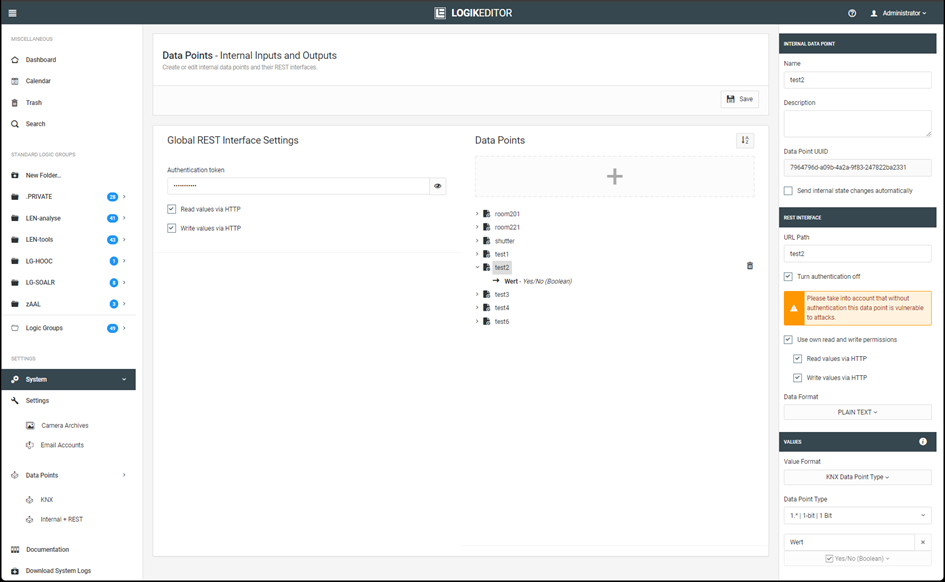
Command via CURL:
curl -vvv http://192.168.1.222:81/le/rest/test2
Output:
janni@bt-laptop2:~$ curl -vvv http://192.168.1.222:81/le/rest/test2

Trying 192.168.1.222:81...
Connected to 192.168.1.222 (192.168.1.222) port 81 (#0)
> GET /le/rest/test2 HTTP/1.1
> Host: 192.168.1.222:81
> User-Agent: curl/7.81.0
> Accept: */*
>

Mark bundle as not supporting multiuse
< HTTP/1.1 200 OK
< content-length: 5
< content-type: text/plain
< last-modified: Mon, 24 Jun 2024 12:07:21 GMT
< date: Mon, 24 Jun 2024 12:07:22 GMT
< access-control-allow-origin: *
< x-xss-protection: 1; mode=block
<

Connection #0 to host 192.168.1.222 left intact
false
Note
This example uses HTTP and transmits the data without encryption. Use HTTPS whenever possible.
Third example
In this example, an RGB value in JSON format is transmitted to a REST data point.
-
Switch command: RGB value is sent
-
Protocoll: http
-
Data format: JSON
-
Value format: KNX data point type DPT232 (3x 1-byte value)
-
Authentication: activated
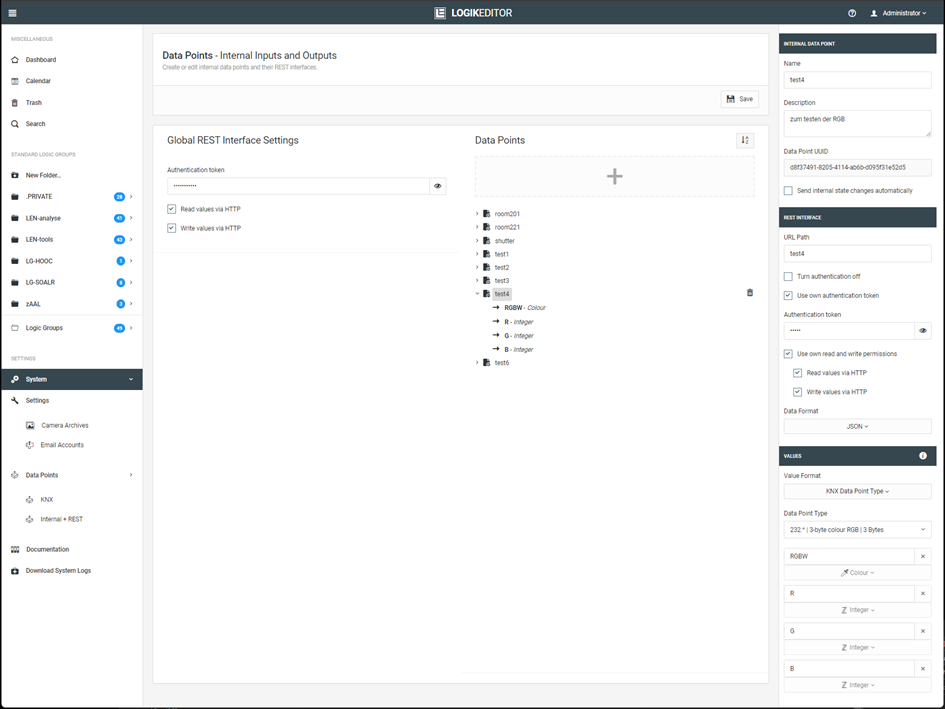
Command via CURL:
curl -vvv -H "Content-Type: application/json" -H "Authorization: test4" http://192.168.1.222:81/le/rest/test4 -d '{"RGBW":"-4718592","R":"127","G":"127","B":"127"}' (command in one line)
Alternatively, the command can be executed entirely on a single line.
Output:
janni@bt-laptop2:~$ curl -vvv -H "Content-Type: application/json" -H "Authorization: test4" -X POST http://192.168.1.222:81/le/rest/test4 -d '{"RGBW":"-4718592","R":"127","G":"127","B":"127"}'

Trying 192.168.1.222:81...
Connected to 192.168.1.222 (192.168.1.222) port 81 (#0)
> POST /le/rest/test4 HTTP/1.1
> Host: 192.168.1.222:81
> User-Agent: curl/7.81.0
> Accept: */*
> Content-Type: application/json
> Authorization: test4
> Content-Length: 49
>

Mark bundle as not supporting multiuse
< HTTP/1.1 200 OK
< content-type: application/json
< date: Mon, 24 Jun 2024 12:16:11 GMT
< content-length: 49
< access-control-allow-origin: *
< x-xss-protection: 1; mode=block
<

Connection #0 to host 192.168.1.222 left intact
{"RGBW":"-4718592","R":"127","G":"127","B":"127"}
Warning
In this example, the authentication token is transmitted via HTTP. As a result, both the token and the payload data are transmitted without encryption.
Use HTTPS for authenticated access whenever possible.
Fourth example
In this example, two individually defined values are transmitted in a single request: a Boolean value and an integer value.
-
Switch command: Consisting of 1x Boolean and 1x integer value
-
Protocol: https
-
Data format: JSON
-
Value format: Individual (consists of two values; 1x Boolean and 1x integer)
-
Authentication: activated
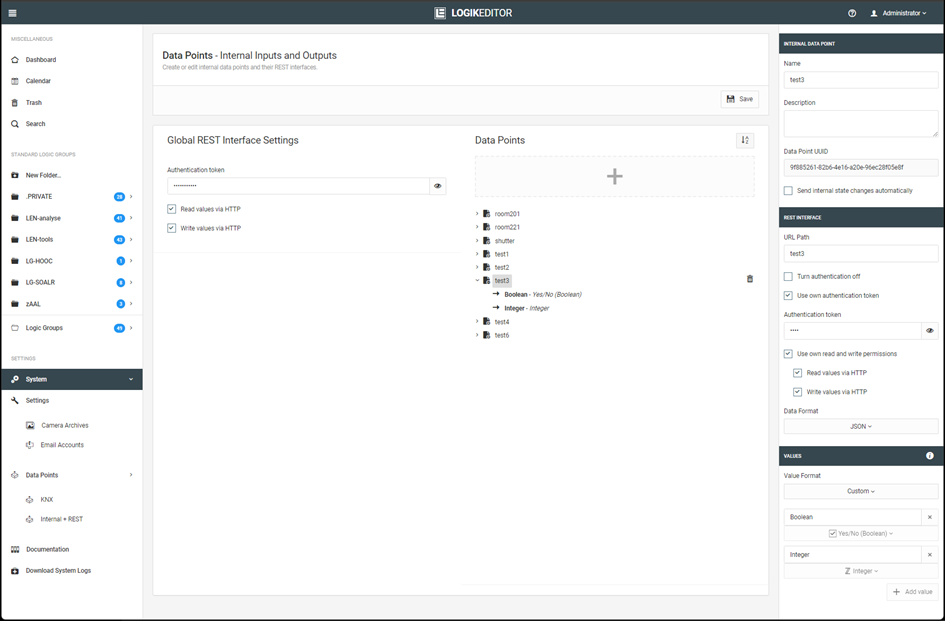
Command via CURL:
curl -k -vvv -H "Content-Type: application/json" -H "Authorization: test" https://192.168.1.222:444/le/rest/test3 -d '{"Boolean":true, "Integer":99}'
Output:
janni@bt-laptop2:~$ curl -k -vvv -H "Content-Type: application/json" -H "Authorization: test" https://192.168.1.222:444/le/rest/test3 -d '{"Boolean":true, "Integer":99}'

Trying 192.168.1.222:444...
Connected to 192.168.1.222 (192.168.1.222) port 444 (#0)
ALPN, offering h2
ALPN, offering http/1.1
TLSv1.0 (OUT), TLS header, Certificate Status (22):
TLSv1.3 (OUT), TLS handshake, Client hello (1):
TLSv1.2 (IN), TLS header, Certificate Status (22):
TLSv1.3 (IN), TLS handshake, Server hello (2):
TLSv1.2 (IN), TLS header, Finished (20):
TLSv1.2 (IN), TLS header, Supplemental data (23):
TLSv1.3 (IN), TLS handshake, Encrypted Extensions (8):
TLSv1.2 (IN), TLS header, Supplemental data (23):
TLSv1.3 (IN), TLS handshake, Certificate (11):
TLSv1.2 (IN), TLS header, Supplemental data (23):
TLSv1.3 (IN), TLS handshake, CERT verify (15):
TLSv1.2 (IN), TLS header, Supplemental data (23):
TLSv1.3 (IN), TLS handshake, Finished (20):
TLSv1.2 (OUT), TLS header, Finished (20):
TLSv1.3 (OUT), TLS change cipher, Change cipher spec (1):
TLSv1.2 (OUT), TLS header, Supplemental data (23):
TLSv1.3 (OUT), TLS handshake, Finished (20):
SSL connection using TLSv1.3 / TLS_AES_256_GCM_SHA384
ALPN, server did not agree to a protocol

Server certificate:
subject: C=de; DC=de; DC=BAB TECHNOLOGIE; O=BAB TECHNOLOGIE GmbH; CN=epv3.bab-tec.de
start date: Aug 16 08:29:34 2019 GMT
expire date: Aug 13 08:29:34 2029 GMT
issuer: C=de; DC=de; DC=BAB TECHNOLOGIE; O=BAB TECHNOLOGIE GmbH; OU=BAB TECHNOLOGIE Signing CA; CN=BAB TECHNOLOGIE Signing CA

SSL certificate verify result: self-signed certificate in certificate chain (19), continuing anyway.

TLSv1.2 (OUT), TLS header, Supplemental data (23):
> POST /le/rest/test3 HTTP/1.1
> Host: 192.168.1.222:444
> User-Agent: curl/7.81.0
> Accept: */*
> Content-Type: application/json
> Authorization: test
> Content-Length: 30
>

TLSv1.2 (IN), TLS header, Supplemental data (23):
TLSv1.3 (IN), TLS handshake, Newsession Ticket (4):
TLSv1.2 (IN), TLS header, Supplemental data (23):
TLSv1.3 (IN), TLS handshake, Newsession Ticket (4):
old SSL session ID is stale, removing
TLSv1.2 (IN), TLS header, Supplemental data (23):

Mark bundle as not supporting multiuse
< HTTP/1.1 200 OK
< content-type: application/json
< date: Mon, 24 Jun 2024 12:21:16 GMT
< content-length: 30
< access-control-allow-origin: *
< x-xss-protection: 1; mode=block
<

Connection #0 to host 192.168.1.222 left intact
{"Boolean":true, "Integer":99}
Note
The -k option instructs cURL to skip certificate verification. In this example, it is required if the certificate used by the device is not considered trusted by the requesting system.
Use -k only when necessary for the specific use case.
///