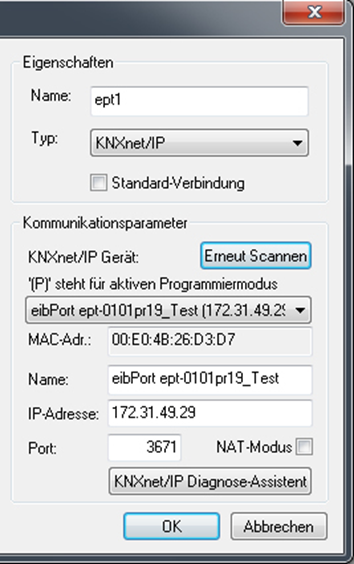
Please employ the "KNXnet/IP tunnelling" protocol to use the EIBPORT as commissioning interface for the ETS. The connection can be established both locally and via the internet/intranet. The latter requires the communication to be enabled in the firewall first.
EIBPORT settings
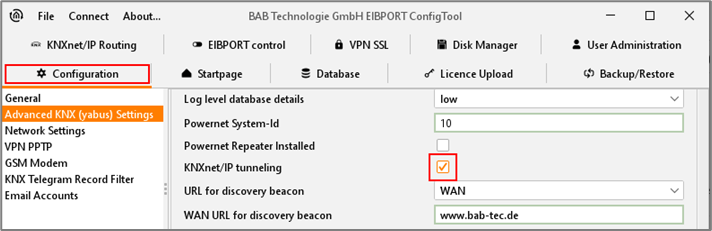
In the EIBPORT, under "System" > "Configuration" > "Extended EIB (yabus) settings", enable the option "KNXnet/IP tunnelling". The KNXnet/IP tunnelling connection of the ETS 5 requires two free (virtual) physical addresses in the KNX network for communication. The addresses are used only temporarily for the "tunnelling" connection. Thus, they are configured separately in the EIBPORT in addition to the actual physical address (phys. Address of the BCU). See also chapter Physical address.
-
Use the check box at the bottom of the menu "Extended EIB (yabus) settings" to enable the protocol. Also see chapter KNXnet/IP Tunneling
ETS settings
-
In the ETS 5 go to the menu "Bus" > "Interfaces".
-
Find the EIBPORT by the EIBPORT name and the IP address.
-
Highlight the desired device and perform the "test".
-
After the test has been completed successfully, attribute the interface permanently to the ETS by clicking on "Select".
The ETS will then automatically use this interface for all connections relevant to KNXnet/IP tunnelling.
Programming via the Internet
For a connection over the Internet requires a valid EIBPORT the "default gateway" in its network settings. In addition, the router must be in place before the firewall or NAT rules accordingly. The communication between EIBPORT and ETS applies to the UDP port 3671 instead! Manually enter in the ET, the IP address in the box provided, since an automatic search for the devices for the drop-down list does not work via the Internet. Moreover, there must be activated with a remote connection to the mandatory "NAT mode".
Settings in the ETS 3 & 4
-
Open the menu "Extras" > "Options" > "Communication" in the ETS and press "Configure interface".
-
Select "KNXnet/IP" as protocol type.
-
Manually enter the address of the EIBPORT.